

Click here for full run details and trajectories
TLDR
- Browser agents perform poorly on write-heavy tasks (e.g. logging in, filling out forms, downloading files), with SOTA agents only reaching 46.6% success rate.
- Agent performance for read heavy tasks (e.g. extracting information out of websites) is very good with most agents achieving >75% success rate.
- Infrastructure issues remain a huge blocker to browser agent performance on the real web. These include proxies, captcha, and login/authentication.
Intro
Browser-based agents have huge potential for automating tedious, knowledge-based tasks. Unlike traditional Robotic Process Automation (RPA), browser agents thrive in dynamic, varied web environments, reliably handling complex workflows across constantly changing websites.
Demand for these agents is surging, driven by new releases from OpenAI and Anthropic, as well as grassroots adoption of open-source tools like Skyvern, BrowserUse, and Stagehand. Yet, the community lacks robust benchmarks for measuring real-world performance. Existing benchmarks either use offline simulations (e.g., WebArena) or focus narrowly on simple tasks (e.g., WebVoyager), quickly becoming oversaturated.
To address this, we're introducing Web Bench. Web Bench is a rigorous benchmark designed to evaluate browser agents on ~5,750 realistic tasks across over 500 real-world websites. We're open-sourcing ~2,454 tasks across 452 sites in partnership with Skyvern.
Below, we detail our dataset creation, evaluation methods, and comprehensive findings.
Dataset Composition
Web Bench is composed of 2454 tasks across 452 websites.
Each task is tagged with a category depending on its objective.
| Category | Description | Count (% of dataset) |
|---|---|---|
| READ | Tasks that require searching and extracting information. Example: "Navigate to the news section and summarize the headline and key points from the latest science policy update." | 1580 (64.4%) |
| CREATE | Tasks that require creating data on the website. Example: "Log in to your account and create a new board titled 'Summer 2024' in the 'Wish List' section, then add a 'sleeveless midi dress' from the Women's category to it." | 512 (20.9%) |
| UPDATE | Tasks that require updating data on the website. Example: "Adjust your journal notification preferences in your Springer account to receive email updates about 'Online First' articles instead of the default monthly summary." | 173 (7.1%) |
| DELETE | Tasks that require deleting data from the website. Example: "Log in to your account, create a temporary test question in the Academia community titled 'Test Question for Deletion,' then delete it and confirm its removal from your profile." | 149 (6.1%) |
| FILE_MANIPULATION | Tasks that require downloading a file from the internet. Example: "Locate a downloadable recipe printout for a popular dessert recipe, download the file, and verify that the filename includes the recipe's name." | 40 (1.5%) |
A common challenge when testing browser agents on tasks like updating or deleting items on real websites is that these actions need something already present to work on. For example, to delete an order, there first needs to be an order that exists. We solved this issue in our dataset by pairing every update or delete task with a matching create task. This means the agent first creates the necessary data, then updates or deletes it. If the agent fails at either step, it receives a penalty. Combining tasks like this also ensures each task is self-contained and complete.
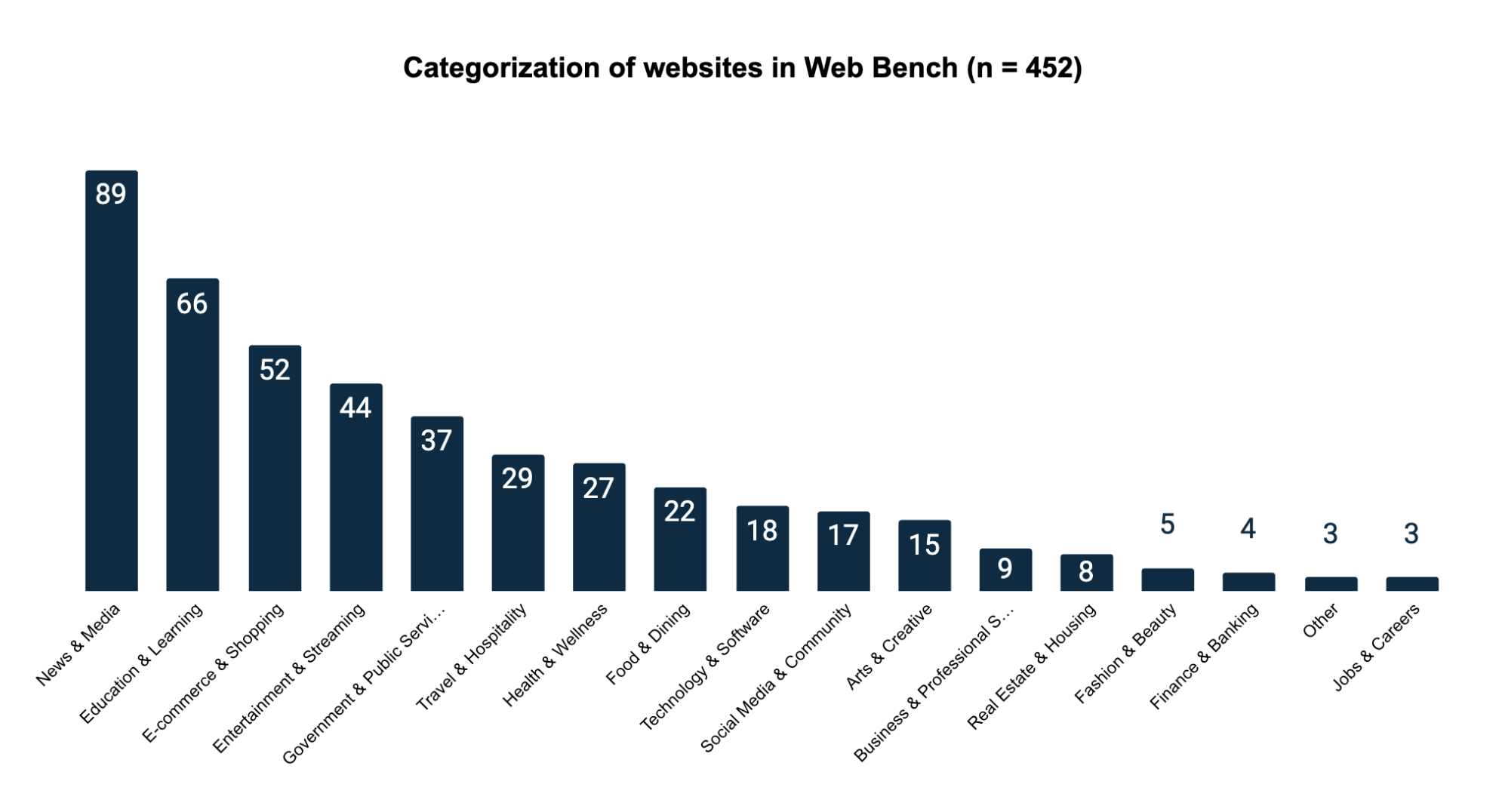
The 452 websites are distributed across 17 primary categories. We sampled the benchmark websites from the top 1000 websites in the world measured by web traffic. We then cleaned this dataset of sites by removing repeat domains, sites without English translations, or sites that were blocked by paywall.
Dataset Creation Methodology
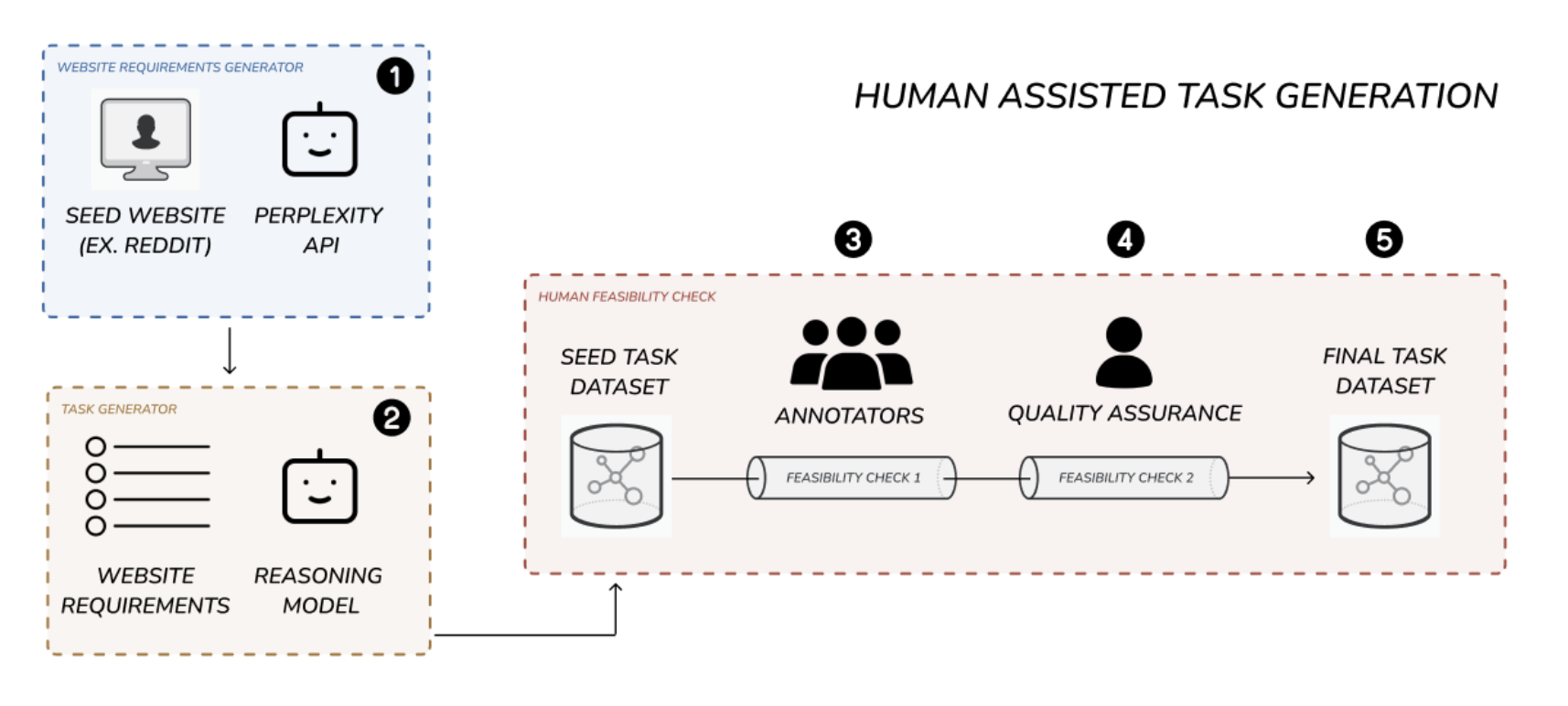
In order to generate the 2454 tasks, we developed a human assisted task generation pipeline. This 5-step pipeline produced high quality, realistic, feasible browser use tasks at a low cost and scalable volume.
Why did we employ a human assisted pipeline?
We started with a fully manual approach. However, we quickly realized this would not work. It was too slow, too expensive, and task quality was low. This approach requires an annotator to be responsible for exploring the site, creating a diverse set of realistic tasks, and confirming that each task was feasible. This is an extremely high mental burden.
We then attempted to fully automate task creation using large language models. This showed initial promise: tasks sounded more realistic and complex. Moreover, it was significantly more scalable. Unfortunately, as we performed QA, we realized that a large majority of the tasks suffered from hallucinations. They referenced parts of sites that didn't exist, described actions that could not be taken, or required steps beyond current agent capabilities.
Our final pipeline combined the best elements of both the manual and automated approaches. First, we automated the website exploration and initial task creation using our requirements and task generator modules. This took the mental burden of task creation off the annotators. Second, we employed human annotators to filter out or refactor hallucinated tasks. Finally, the filtered tasks were quality checked and submitted into the final dataset.
As a result, task quality increased significantly, while cost per task creation dropped by 47%.
Step 1: Website Requirements Generator (appendix A)
To efficiently create realistic tasks for each website, we first needed to understand the functionalities available to users. We developed a "website requirements generator" module that takes a website URL and uses Perplexity AI's search index API to generate a detailed list of possible user functionalities.
Step 2: Initial Task Generation
Next, we generated an initial set of tasks for each site. Using the website URL and its functionality overview, a language model created a variety of realistic tasks. These tasks were standardized and categorized by type (e.g., read, write, update, login) and included metadata like difficulty, category, and necessary login credentials. By default, we generated 30 tasks per website to maximize task diversity.
Step 3: Annotator Feasibility Check (appendix B)
Annotators then reviewed tasks to ensure feasibility. They checked each task directly against the website, marking tasks as feasible or not. Annotators had site access and login credentials when needed. Approximately 55% of tasks were deemed infeasible and removed, leaving around 45% to move forward.
Step 4: Quality Assurance Feasibility Check
Each feasible task underwent additional quality checks by our QA team, who:
- Spot-checked tasks
- Removed tasks inconsistent with dataset goals (e.g., payment, file uploads)
- Clarified task wording for improved readability
This QA step removed about 15% more tasks.
Step 5: Final Dataset Sampling / Benchmark Selection
After QA, we had about 5757 usable tasks. We sampled around 2700 tasks as the benchmark dataset and kept the rest as holdouts. During evaluation, we further trimmed tasks down to 2454 by removing tasks that became infeasible due to website changes. Details about these removed tasks can be found in the evaluation methodology section.
High Level Estimates of task generation pipeline efficiency
| Stage | Tasks Left | Percent of initial |
|---|---|---|
| Task Generation | 15000 | 100.0% |
| Annotator Feasibility Check | 6774 | 45.2% |
| QA Feasibility Check | 5757 | 38.4% |
Execution Methodology
We tested WebBench using seven AI agent and browser infrastructure setups:
- Skyvern 2.0 on Skyvern Infrastructure
- OpenAI CUA on Skyvern Infrastructure
- Anthropic Computer Use on Skyvern Infrastructure
- Skyvern 2.0 on Browserbase Infrastructure
- OpenAI Operator (Human-in-the-loop)
- Convergence AI (Human-in-the-loop)
- Browser Use Cloud API
Human-in-the-Loop Testing (HITL)
OpenAI Operator and Convergence AI are popular browser agent systems but don't offer API access. To include these products, we randomly selected 323 tasks and had human annotators execute them via the product UIs. Annotators only intervened when prompted by the system (e.g., for login credentials). Each session was screen-recorded with Loom, and recordings are available on our dataset GitHub.
Browser Use Cloud API
Browser Use offers a native cloud API for their agent. Due to cost constraints, we tested this setup using a smaller subset of 658 tasks.
Login Credentials and Authentication
Many tasks require user authentication. To address this, we created necessary accounts for all relevant websites. Usernames and passwords were stored in a CSV, then dynamically appended to prompts during task execution, providing agents with required login details.
Site Domain Restriction
Our dataset aims to evaluate browser agents' abilities on specific websites. Thus, agents were instructed explicitly to stay within the initial website domain provided. During evaluation, agents were penalized for leaving the domain or using external tools like Google search.
We chose single-site restrictions to keep the benchmark focused and precise. However, real-world tasks often require visiting multiple websites or using web searches. Some tasks in our dataset could technically be completed without accessing the intended site. We recognize this limitation and suggest exploring multi-site or unrestricted tasks in future research.
Example Task Prompt
Log in to your account, create a saved wish list called "Vacation Wardrobe", and add one item each from Women's sweaters, accessories, and skirts categories.

Only use http://nordstrom.com to achieve the task. Don't go to any other site. The task is achievable with just navigation from this site.

If you need to login, use the following credentials: {
  username: 'username@gmail.com',
  password: 'password',
  authtype: 'Regular' | 'Google'
}
Evaluation Methodology
In order to evaluate the results of each agent trajectory, we employ a team of human annotators. The annotators are given the following information:
- The task
- The output produced by the browser agent
- A screen recording of the browser agent's trajectory
The annotators are then asked to label the trajectory with one of the 3 annotation options along with detailed reasoning for why they chose the label.
| Label | Description |
|---|---|
| Success | The agent navigates to the correct section and executes the task given |
| Failure | The agent does not complete the task OR takes approach not specified by the instructions of the task (example, leaving website domain) |
| Bad Task | The task is not feasible |
See full annotator rubric in appendix section B.
The "Bad Task" label is important when testing on real world websites because GUIs and workflows are dynamic and change everyday. Tasks that were possible during the creation of the dataset may become outdated as websites evolve into new configurations. This label served as a "catch all" to find and exclude tasks that were not feasible. These tasks are subsequently removed from the final results section and dataset.
We chose to go with human annotators as our evaluation approach for a few reasons.
- Human annotators allowed us to have an additional screener for "bad tasks" by checking the feasibility of every task on the site itself
- Human annotators produced high quality error analysis for why the AI agent failed. This is critically important for the broader analysis and takeaways.
- Human annotated results give us a baseline to benchmark the performance of automated evaluation methods. We will continue to investigate this approach in future work.
With our human annotated data we plan to eventually create a highly aligned model as a judge system to enable easier self service of this benchmark.
Results
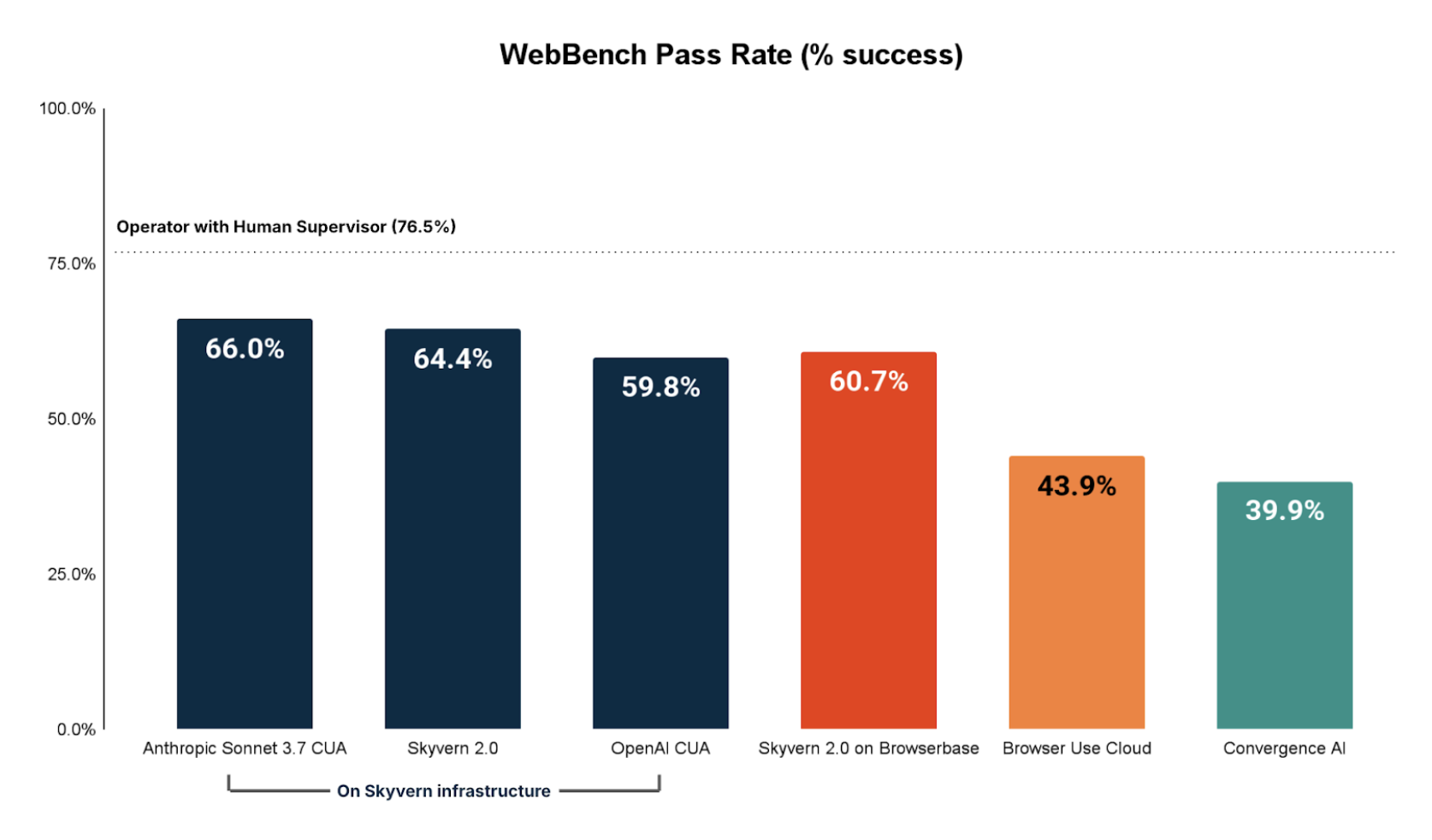
We use OpenAI Operator with a human in the loop as the state of the art baseline.
The best performing fully automated browser agent is Anthropic CUA completing 66.0% of all tasks.
READ Tasks Performance
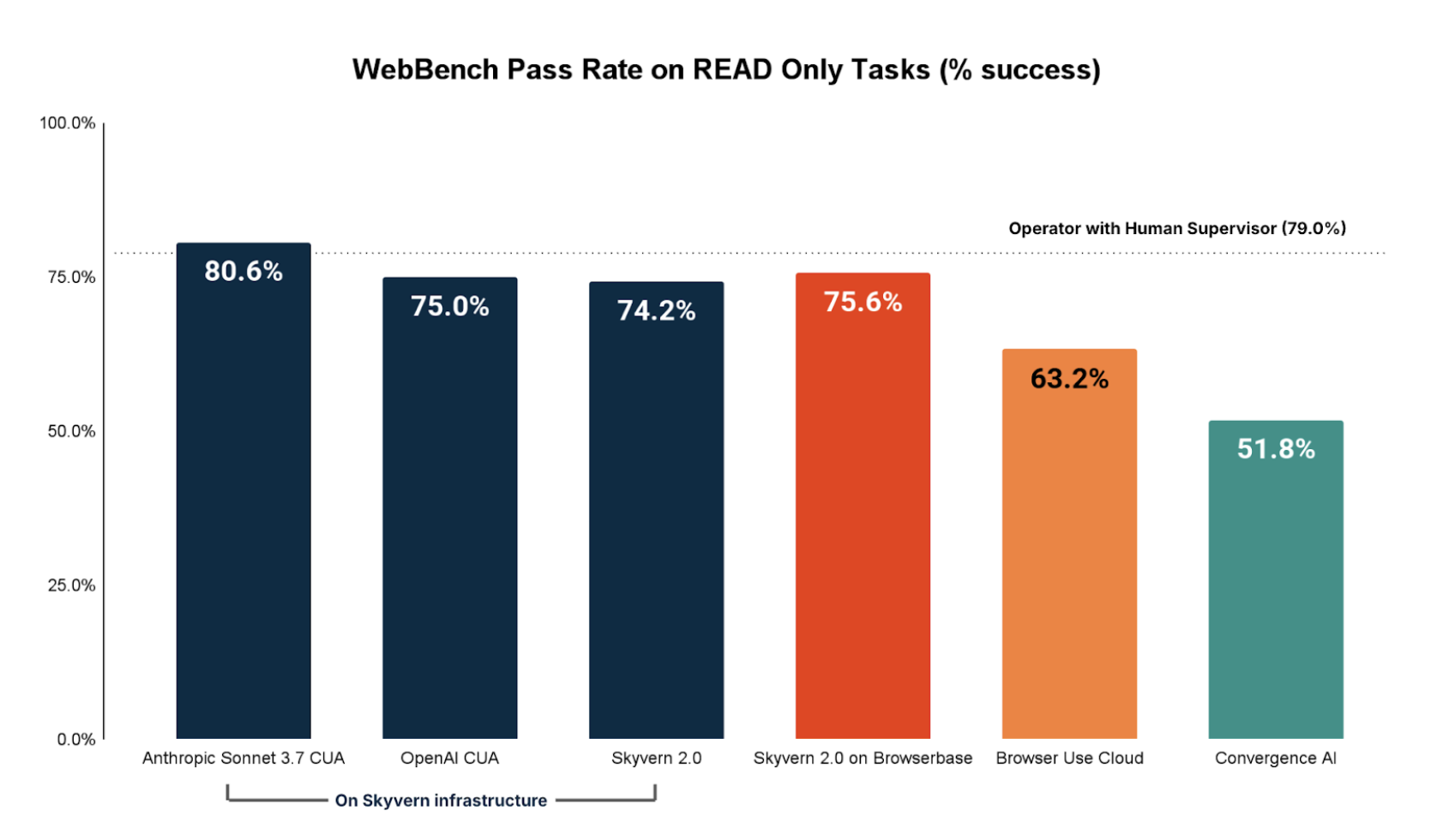
Broken down by READ only tasks, we see that Anthropic CUA impressively outperforms OpenAI Operator with human in the loop. More broadly, it is clear that browser agents today are adequate to good on most READ tasks as 5/7 of the browser agents we tested successfully achieved >70% of all READ tasks.
NON-READ Tasks Performance
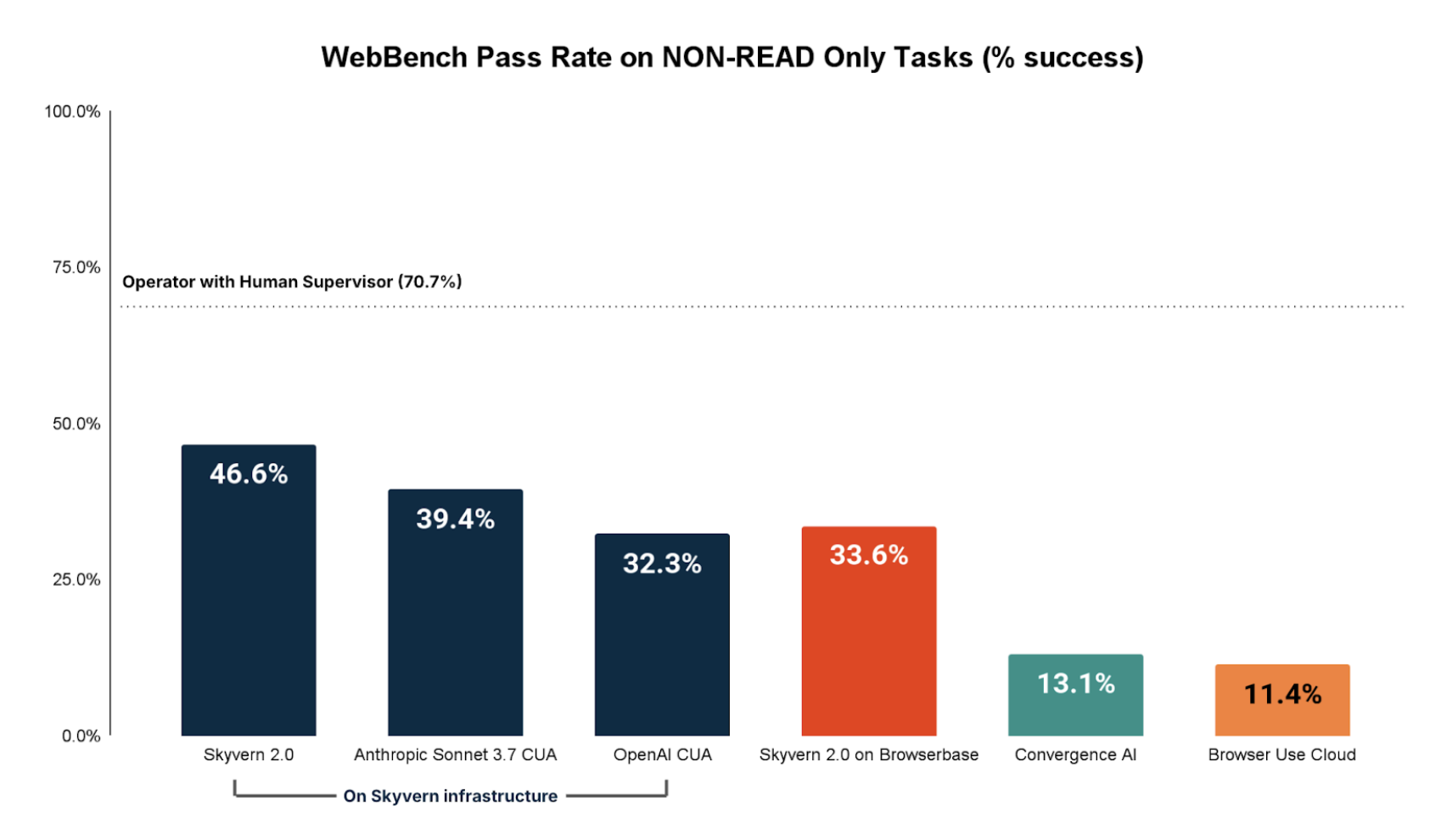
Broken down by NON-READ only tasks (Create, update, delete, file manipulation, etc) we see performance lags significantly. The best fully automated browser agent on NON-READ tasks is Skyvern 2.0 completing 46.6% of NON-READ tasks.
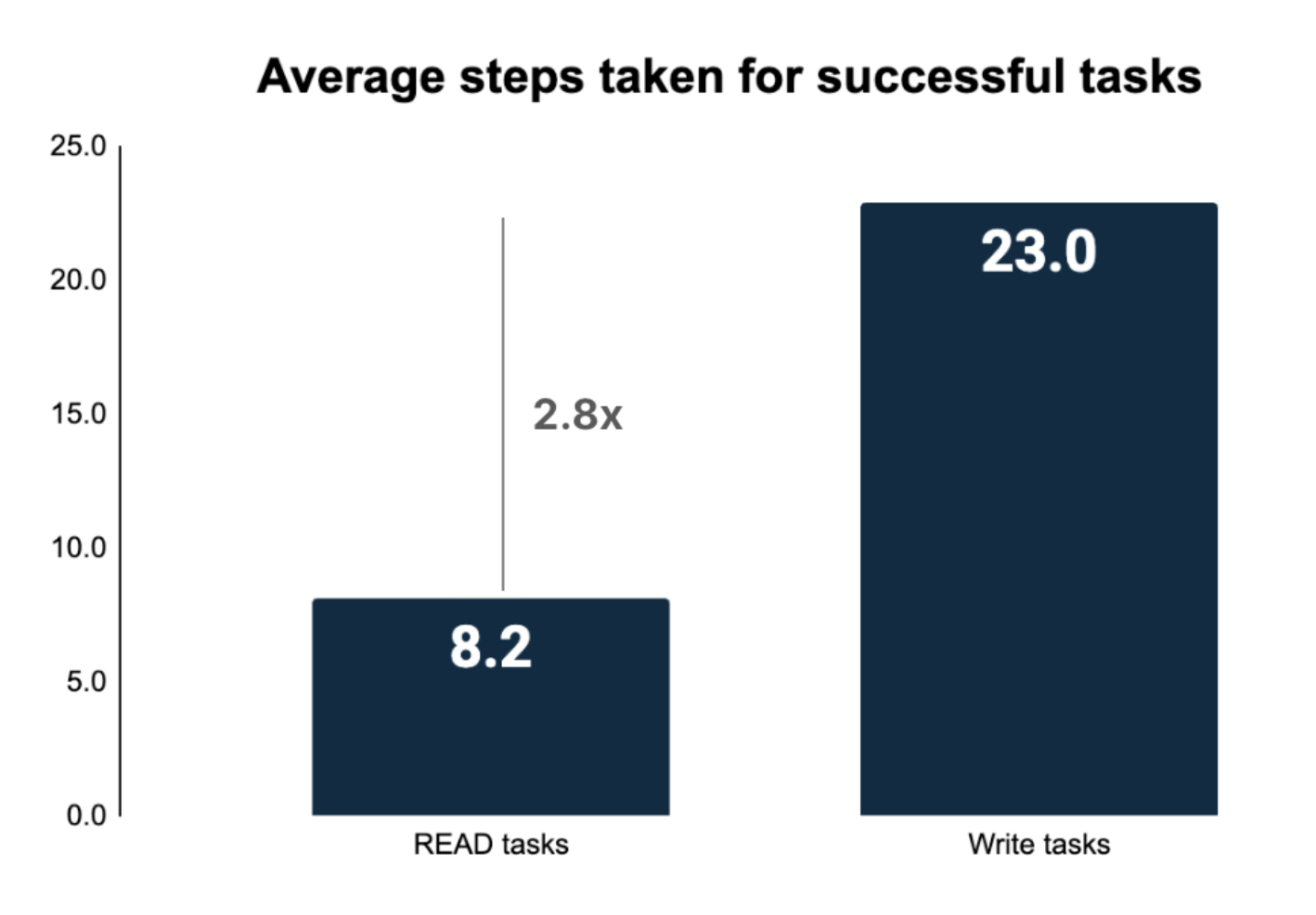
This result highlights how browser agents still struggle heavily with NON-READ tasks on the real world web. We believe a big reason for this is the longer trajectories necessary for NON-READ tasks.
Why NON-READ tasks are more difficult
NON-READ tasks require significantly more steps for completion. In order to take NON-READ operations on the real web, browser agents need to contend with:
- More complex UIs
- Login and authentication
- Longer context memory / steps
The more steps a browser agent takes, the higher the chance of failure.
Error Analysis
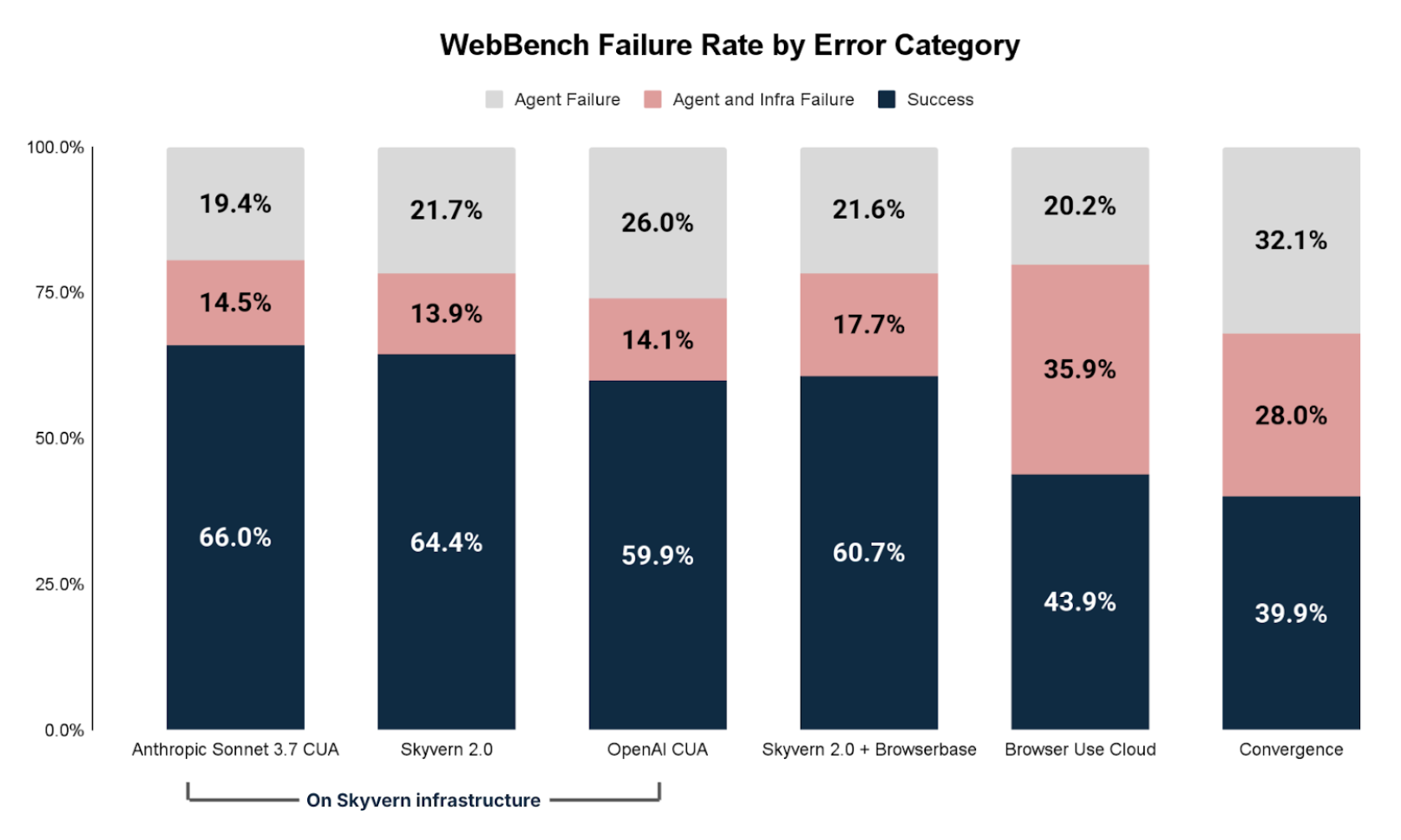
Failed tasks can primarily be grouped into two buckets:
- Browser Agent Problems: Failure caused by the agent being unable to complete the task
- Infrastructure Problems: Failure caused by the AI agent being blocked by outside issues (proxy, captcha, login/auth, etc)
The two are not necessarily correlated. For example, if an infrastructure failure is addressed (example removing a proxy block) it does not necessarily guarantee the agent would still successfully complete the task.
Infrastructure Failure
The most common infrastructure issues were:
- Proxy: the website is inaccessible or blocked
- Captcha verification: the agent is blocked by captcha / bot detection
- Login and authentication: the agent is unable to log into the domain
AI Agent Failure
The most common agent issues were:
- Navigation Issue: the agent cannot navigate the web page, gets stuck, or gets blocked by a UI element (ex. popup)
- Time Out: the agent takes too long to complete the task and exceeds the step limit
- Incomplete Execution: the agent does not do something specifically requested in the task query, or the agent thinks it is done when it is not
- Information Extraction Issue: the agent can navigate the web page, but cannot extract the information requested or extracts it incorrectly
- Leaves Website: the agent leaves the starting url and goes to a different website. We penalize these as failures
- Other/Not enough info: these are issues that do not fit into the above categories or where the error analysis does not provide enough information to make a determination
Discussion
Testing browser agents on real-world websites is crucial for accurately measuring their performance, but this approach has notable challenges.
Dynamic Nature of Websites
Real websites frequently change, making tasks outdated when pages or elements are modified or removed. To manage this, WebBench uses annotators to label infeasible tasks as "Bad Task," removing them from the final results. An alternative solution, snapshotting and hosting offline versions of websites, presents scalability and operational hurdles.
This is the central goal of our environments platform. If you are interested, please contact us at jerry@halluminate.ai.
Task Distribution vs. Real-world Use Cases
Web Bench tasks may not fully align with enterprise browser automation scenarios, such as those in robotic process automation (RPA). For instance, while Web Bench includes login and authentication steps in tasks, many real-world applications start from a pre-logged-in state. Consequently, performance on these login tasks may not reflect practical, real-world effectiveness.
Safety and Ethical Concerns
Testing on real websites raises significant ethical and safety issues, including unintended actions affecting actual users, such as restaurant reservations, posting live comments, or adding real users as friends. Given the rising prevalence of malicious bots that degrade user experiences, distinguishing harmless automated tasks from malicious interactions becomes difficult. Web Bench continuously reviews tasks to identify and mitigate potential safety and ethical problems in future benchmarks.
Conclusion
Key Takeaways for AI Engineers
- Be Clear About Your Use Case: Determine whether your browser agent primarily handles READ or WRITE-heavy tasks. If building a WRITE-heavy application, invest in thorough testing and evaluation before scaling to production.
- Prioritize Robust Infrastructure: Not all browser infrastructure providers deliver the same performance. Our testing highlights significant performance variations between providers. Ensure your browser agent is interoperable with multiple infrastructure providers, allowing you flexibility based on your specific needs.
- Combine Browser Agents with Automation Frameworks: Browser agents excel at handling diverse tasks across varied interfaces. However, for workflows that are repetitive and require precision, traditional browser automation frameworks (e.g., Playwright) may be preferable. Leading browser agent companies effectively leverage a hybrid model, deploying browser agents for complex or varied tasks and automation frameworks for tasks demanding high accuracy, speed, and reliability.
Areas for Improvement
- Develop Long-Term Memory Capabilities: Write-heavy and complex, multi-step tasks often require significantly longer trajectories than simple read tasks. Our findings show these tasks may require 2-5x more steps, highlighting the need for enhanced long-term memory contexts to maintain performance throughout extensive workflows.
- Improve Browser Primitives for Payment and Authentication: Current authentication and payment systems are designed primarily for human users and pose significant challenges for autonomous browser agents. There's a clear need for basic browser primitives specifically optimized for AI agents to manage authentication and payments seamlessly.
- Invest in Realistic Training Environments: Advanced browser agents require training in realistic, sandboxed environments that replicate real-world use cases (e.g., simulated Salesforce). Today, there's a notable shortage of these environments. At Halluminate, we're addressing this gap by providing fully managed environments and benchmarks to help teams train browser agents with superhuman capabilities.
Our goal is to continue maintaining Web Bench for the community. We would love your feedback and cooperation.
Appendix
Section A: Requirements Generator Module
Input: reddit
Output Requirements:
URL: https://www.reddit.com/

Reddit is a social news aggregation and discussion platform organized into
topic-specific communities. Below is a structured analysis of its capabilities
and limitations for task generation:

1. Website Type and Purpose
Type: Social media/content platform hybrid combining forums, news aggregation,
and community-driven discussions.
Primary Purpose: Facilitate content discovery, community engagement, and
real-time discussions across niche interests.
Target Users:
- Niche community enthusiasts (e.g., gamers, hobbyists)
- News consumers seeking unfiltered discussions
- Brands/marketers targeting engaged audiences

2. Core Features and Functionality
Content Consumption:
- Browse personalized feeds (Home, Popular, All)
- Search posts/comments by keyword, subreddit, or user
- Filter content by time (Hot, New, Top, Controversial)
- View multimedia (text, images, videos, links)

Content Creation:
- Submit posts (text, links, images, polls, videos)
- Create and moderate subreddits (topic-specific communities)

User Interaction:
- Upvote/downvote posts and comments
- Reply to comments, award Reddit coins (virtual tokens)
- Follow users/subreddits, send direct messages

Account Management:
- Customize profile bio, avatar, and banner
- Manage notifications, block users, and track karma (reputation points)
- Adjust privacy settings and content preferences

Transactions:
- Purchase Reddit Premium (ad-free experience)
- Buy virtual awards/coins for gifting

File Operations:
- Upload images/videos (limited formats/sizes)
- Export saved posts/comments via third-party tools

3. Authentication and Access
Authentication Required: Voting, commenting, posting, creating subreddits,
and direct messaging
User Roles:
- Regular users: Post, comment, vote
- Moderators: Manage subreddit rules/content
- Admins: Oversee platform-wide policies

Public vs. Private:
- Most subreddits are public
- Private subreddits require approval to view/post

4. Notable Limitations
Functional Restrictions:
- No native content scheduling tools
- Limited profile customization (e.g., no LinkedIn-style portfolios)
- No built-in analytics for individual posts

Policy Restrictions:
- Self-promotion heavily discouraged in most communities
- Strict moderation rules vary by subreddit (e.g., banned topics)
- NSFW (not safe for work) content restricted to marked subreddits

5. Unique Characteristics
- Community-Driven Moderation: Subreddits are autonomously managed by users,
  enabling highly specialized niches
- Meritocratic Content System: Upvote-driven ranking ensures popular content
  surfaces quickly
- Anonymity Focus: Usernames are pseudonymous, reducing personal branding
  emphasis
- Trend Incubator: Origin point for internet memes, viral trends, and
  grassroots movements
Section B: Annotation Rubric
Agent trajectory is a Success if it:
- Navigates to the correctly specified section
- Retrieves all the information necessary to answer the task set out
Agent trajectory is a Failure if it:
- Navigates to the wrong section to achieve the task
- Pulls information/executes a task that does not resolve the task objective, or does not complete all the necessary requirements outlined in the objective
- Navigates outside of the website specified in the task
Agent trajectory is a Bad Task if it:
- Task asks agent to do something that is not possible
- Payments - tasks that require money to complete
- Uploads - tasks that require uploading photos/files
Ultimately, the most important thing is your reasoning. Explain in thorough detail why you gave something a pass and especially a failure. Some evaluations are ambiguous and good reasoning is more important than the right answer.
Authors
Suchintan Singh, Shuchang Zheng, Wyatt Marshall, Jerry Wu